Toggle Nav 



Redeem Your Points At Rodalink Now!
Do you know that you can make your cycling purchase experience more fun on Rodalink? By purchasing items on Rodalink, you will get 1 point for every $1 purchase at Rodalink, apply multiples. Your points will be added to your Rodalink account within a day after your purchase at Rodalink store or one day after your order from Rodalink.com has been delivered.
For every 50 points that you have, you can get a discount with multiply $1. This sure is convenient for you who’d love to get your cycling items while also saving your expenses.
Good news! Now you can redeem your points also at Rodalink.com. This provides you more ease to redeem your point.
But what is the difference between redeeming my points at Rodalink stores and Rodalink.com?
The difference is only located in the number of multiple points that can be redeemed. In Rodalink stores, you can redeem as many points as you like, while in Rodalink.com, you can redeem only 50% of total purchase. Don’t miss the opportunity to bring more fun while clearing out your cart.
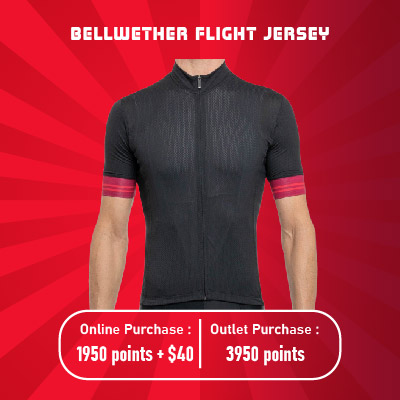
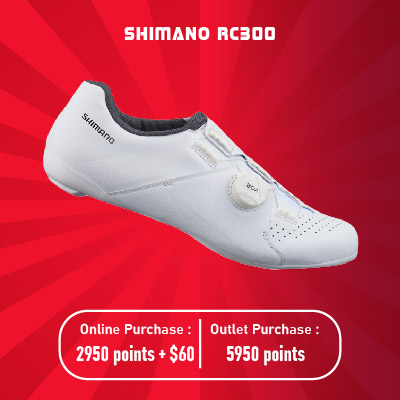
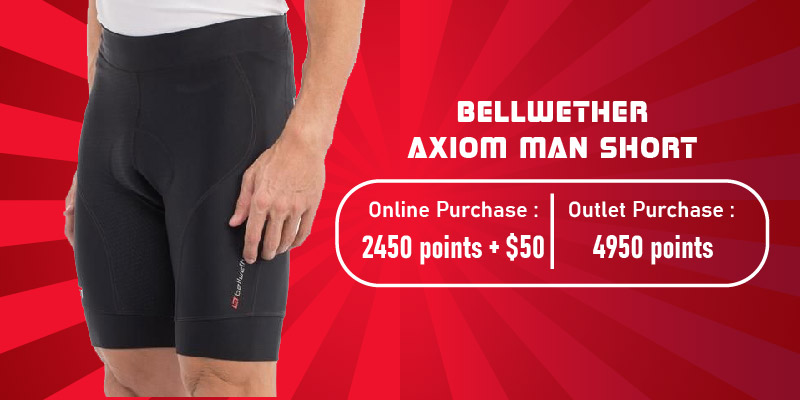
How many points do I need to get certain items?
That being said, for instance you can get these items and save more only by redeeming your points!
 |
 |
How Can I Redeem My Points?
You can redeem your points by simply telling our cashier at your Rodalink store or simply follow the steps provided on How to Redeem Your Points in Rodalink.com.
How Many Points That I Have Now?
You can check your points at Rodalink store or Rodalink.com by logging in to your Rodalink community account. Learn more at How to Check My Points.
What is my benefit of having more points and joining the Rodalink Community?
By joining Rodalink Community, you can join our members’ only event, special service fee or simply redeem the points to get more discount and save your expense for your favorite cycling items.
Learn more about Rodalink Community by clicking this button below.
Please complete your information below to login.
Sign In
Create New Account